Obtain the Optical Modem Super Password and Bridge IPv6
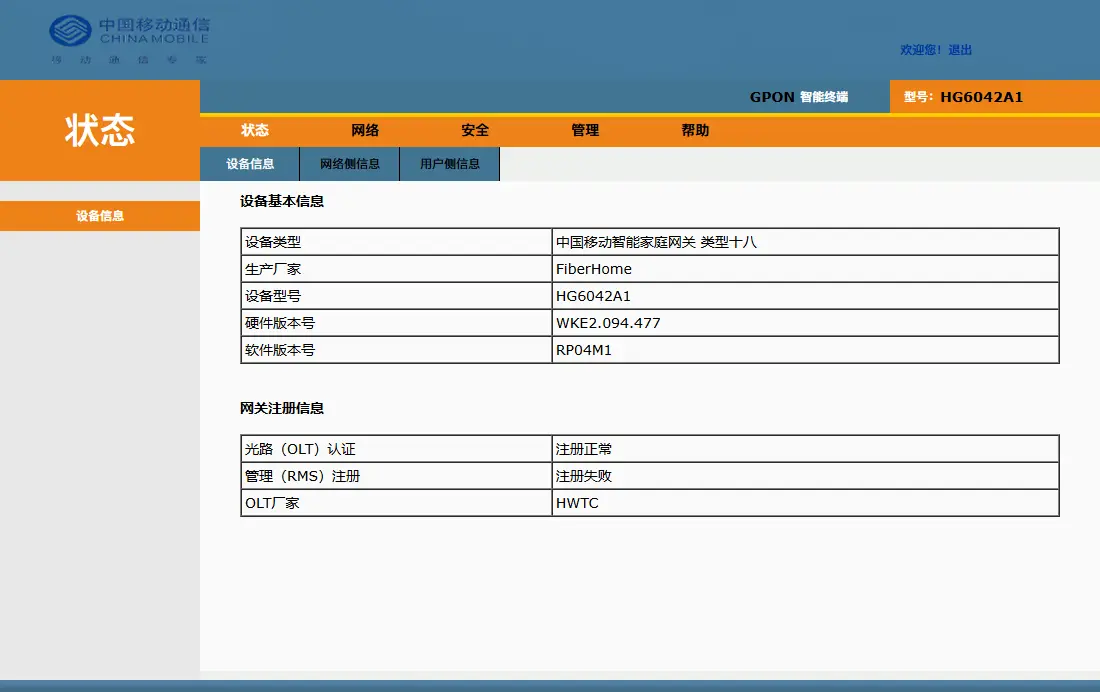
Preface
Years ago, I had already heard about the exhaustion of IPv4 addresses, and I have some pure IPv6 websites. Therefore, I have always wanted to enable IPv6 services for my home network. However, I never had the energy to look into it until recently when I had some free time and finally studied it.
During the process of bridging IPv6, obtaining the super password of the optical modem is the most critical point. After extensive searching and experimentation, I found that my optical modem happened to be one of the most difficult to crack. But fortunately, with guidance from a friend, I was able to crack it.
If it's too troublesome, I recommend directly purchasing a one-click cracking service on Taobao, although it's a bit expensive (that's why I cracked it myself; I was this close to buying it).
Preparation
Tip: This method is theoretically applicable to China Mobile HG series optical modems.
- A photo of the back of the optical modem, which contains the following:
- MAC address
- Username and password of the ordinary user
- A computer running Windows (theoretically, MacOS also works)
- Telnet service
Obtain the Super Password
Local Telnet
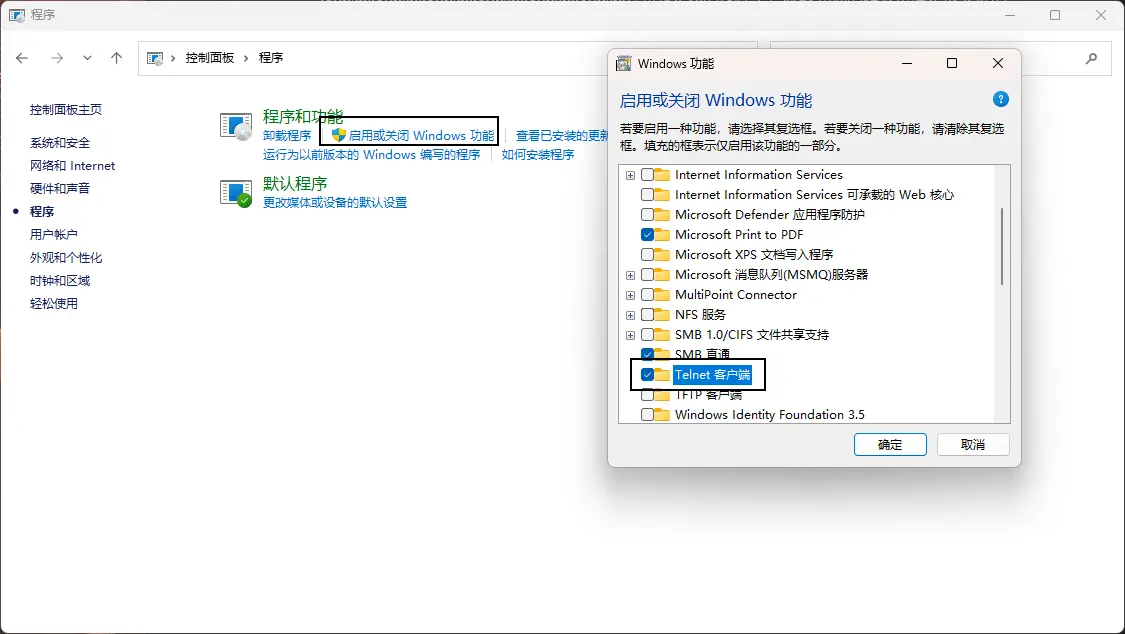
In the Windows Control Panel, enable the Telnet service.
Console Password
Record the MAC address from the back of the optical modem and remove the hyphens.
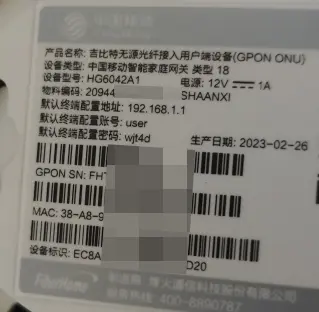
For example, if the MAC address is 54-E0-05-2A-4F-20, remove all hyphens to get 54E0052A4F20.
If you cannot find the MAC address, please read this step. If you successfully found it above, skip this part.
Open the computer console, on Windows it is CMD, and execute:
arp -a
The dialog will display a lot of information. You only need to find the line corresponding to 192.168.1.1. For example:

Here, you only need to see the first line 192.168.1.1 and note down 54:e0:5:2a:4f:20. At this step, don't rush to delete the colons!
Theoretically, there should be 2 characters between each colon, but in this MAC string, you will notice that there is only a single "5" between two colons. At this point, you need to silently add a 0 before the 5, turning it into 54:e0:05:2a:4f:20. Then convert all letters to uppercase and remove the colons, resulting in 54E0052A4F20.
Optical Modem Telnet
Enter the following in the browser: http:/192.168.1.1/cgi-bin/telnetenable.cgi?telnetenable=1&key=
Append the MAC address you just edited after it, like this:
http:/192.168.1.1/cgi-bin/telnetenable.cgi?telnetenable=1&key=54E0052A4F20
At this point, you should see "telnet enabled" displayed in the browser, indicating that Telnet on the optical modem has been successfully enabled.
If the browser shows "Operation error", it means the MAC address was not obtained correctly.
Obtain the Super Password
Open the console and execute:
telnet 192.168.1.1
Then you will be prompted to enter a username and password.
The possible usernames here are many, such as root, admin, etc. You can try them one by one. In my case, the username was admin.
Those familiar with Linux will know that the password input here is invisible by default; just type it correctly.
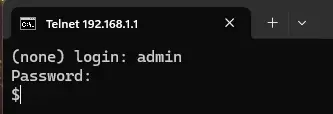
The password here is Fh@ followed by the last six characters of the MAC address you just obtained. For example, my password was Fh@2A4F20.
Then comes a crucial part of obtaining the password: different optical modems have different commands.
Here I demonstrate the commands I used:
cfg_cmd get InternetGatewayDevice.DeviceInfo.X_CMCC_TeleComAccount.Username
cfg_cmd get InternetGatewayDevice.DeviceInfo.X_CMCC_TeleComAccount.Password
Execute both commands separately, and they will display the super administrator's username and password respectively.
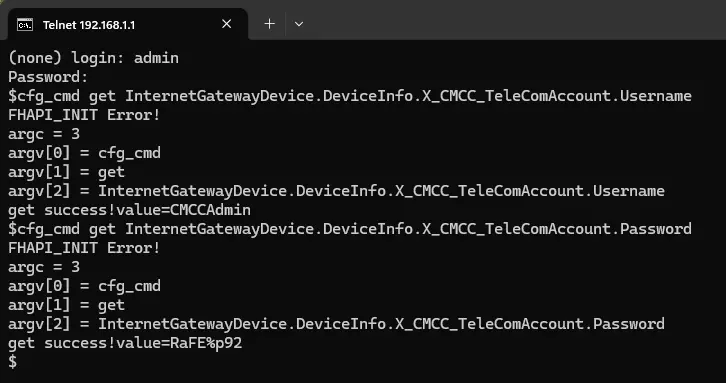
At this point, we have successfully obtained the account and password.
If you are not interested, you can skip the next small section.
Commands that might be used for other optical modems are:
load_cli factory
show admin_name
show admin_pwd
The first command enters factory mode, and the subsequent show commands use factory mode to display the username and password.
Q: The factory mode commands are simple and intuitive, why not use them? A: In the HG6042 series optical modems, using these commands shows "Unknown command". It is said that this issue is caused by the operator blocking the command, but it is also possible that factory mode has lost its privileges. In the 2023 version of China Mobile's FiberHome optical modems, the su password changed, causing a series of problems. As of May this year, only the HG6042 series optical modems remained uncrackable until the issue was resolved around mid-July this year. So this article is still quite fresh.
Q: How was the password obtained for the HG6042 series optical modems?
A: The cfg_cmd get command was used, leveraging the Linux super administrator privileges after Telnet, to obtain the account and password.
Enable IPv6
I won't go into too much detail here. For a tutorial on enabling IPv6, please refer to: How to Enable IPv6 Network Access for Personal Broadband | IP Query (ipw.cn)